No Results Component
The Component
Section titled “The Component”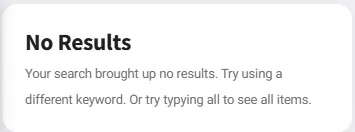
Basic (Single Search Section)
Section titled “Basic (Single Search Section)”<!-- 1. Search Input --><div class="search-box"> <input type="text" id="input_search" data-search-1 placeholder="Search..." /> <a href="#" class="clear-search-1 disabled"> <i class="fa fa-times"></i> </a></div>
<!-- 2. Results Container --><div id="list_items" class="search-results-1"> <div data-filter-item-1 data-filter-name="item one">Item One</div> <div data-filter-item-1 data-filter-name="item two">Item Two</div> <div data-filter-item-1 data-filter-name="item three">Item Three</div></div>
<!-- 3. No Results Section --><div class="card card-style pb-0 mt-1" id="section_noResults"> <div class="search-no-results-1 disabled mt-1 px-2"> <div class="content"> <h1 id="text_no_results" class="ankur_language">No Results</h1> <p id="text_noResults_tag" class="ankur_language"> Your search brought up no results. Try using a different keyword. </p> </div> </div></div>Key Components
Section titled “Key Components”- Search input:
data-search-1(number can be 1, 2, or 3) - Clear button:
.clear-search-1(must match the search number) - Results container:
.search-results-1(must match the search number) - Filter items: [data-filter-item-1] with data-filter-name (must match the search number)
- No results section: .search-no-results-1 (must match the search number)
Important Rules
Section titled “Important Rules”- All components must use the same number (1, 2, or 3)
- The disabled class must be present initially on
.search-no-results-X - Each item needs
data-filter-namewith searchable text
Multiple Independent Search Sections
Section titled “Multiple Independent Search Sections”-
To have multiple independent noResults sections on the same page, use different search system numbers.
-
Three Independent Sections
<!-- ============================================ --><!-- SECTION 1: Crops Search (uses number 1) --><!-- ============================================ --><div class="search-box">  <input type="text" data-search-1 placeholder="Search crops..." />  <a href="#" class="clear-search-1 disabled">    <i class="fa fa-times"></i>  </a></div>
<div class="search-results-1">  <div data-filter-item-1 data-filter-name="tomato">Tomato</div>  <div data-filter-item-1 data-filter-name="potato">Potato</div></div>
<div class="search-no-results-1 disabled">  <h1>No Crops Found</h1></div>
<!-- ============================================ --><!-- SECTION 2: Companies Search (uses number 2) --><!-- ============================================ --><div class="search-box">  <input type="text" data-search-2 placeholder="Search companies..." />  <a href="#" class="clear-search-2 disabled">    <i class="fa fa-times"></i>  </a></div>
<div class="search-results-2">  <div data-filter-item-2 data-filter-name="syngenta">Syngenta</div>  <div data-filter-item-2 data-filter-name="seminis">Seminis</div></div>
<div class="search-no-results-2 disabled">  <h1>No Companies Found</h1></div>
<!-- ============================================ --><!-- SECTION 3: Products Search (uses number 3) --><!-- ============================================ --><div class="search-box">  <input type="text" data-search-3 placeholder="Search products..." />  <a href="#" class="clear-search-3 disabled">    <i class="fa fa-times"></i>  </a></div>
<div class="search-results-3">  <div data-filter-item-3 data-filter-name="product a">Product A</div>  <div data-filter-item-3 data-filter-name="product b">Product B</div></div>
<div class="search-no-results-3 disabled">  <h1>No Products Found</h1></div>
How Independence Works
Section titled “How Independence Works”- Each search system (1, 2, 3) operates independently
data-search-1only filters [data-filter-item-1] itemsdata-search-2only filters [data-filter-item-2] itemsdata-search-3only filters [data-filter-item-3] items- Each
.search-no-results-Xshows/hides based on its own results
Framework search system support
Section titled “Framework search system support”- The framework supports 4 search systems:
data-search (no number)→ .search-results + .search-no-resultsdata-search-1→ .search-results-1 + .search-no-results-1data-search-2→ .search-results-2 + .search-no-results-2data-search-3→ .search-results-3 + .search-no-results-3- Only 3 numbered systems (1, 2, 3) are available. To add more, extend
reset_search()in internal.js.
How the Automatic System Works (Technical Details)
Section titled “How the Automatic System Works (Technical Details)”Working of the automatic search system
-
Page load:
reset_search()initializes search functionality. -
User types: The framework listens for keyup events on
data-search-Xinputs. -
Filtering: It compares the search term with each
data-filter-nameattribute. -
Item visibility: Matching items keep their
disabledclass removed; non-matching items getdisabledadded. -
Counting: The framework counts disabled items within
.search-results-X. -
Toggle logic:
- If disabledCount === totalItems: Remove disabled from
.search-no-results-X(show message) - If disabledCount < totalItems: Add disabled to
.search-no-results-X(hide message) - Clear button: Resets search, hides noResults, and shows all items.
- If disabledCount === totalItems: Remove disabled from
Current framework limitation
Section titled “Current framework limitation”The framework is designed for one-to-one relationships:
data-search-1only filtersdata-filter-item-1itemsdata-search-2only filtersdata-filter-item-2itemsdata-search-3only filtersdata-filter-item-3items- A single input cannot filter both lists using the default behavior.
- To filter multiple lists, use multiple inputs or extend the framework to support multiple filters per input.